10 TV Noise Glitch Textures
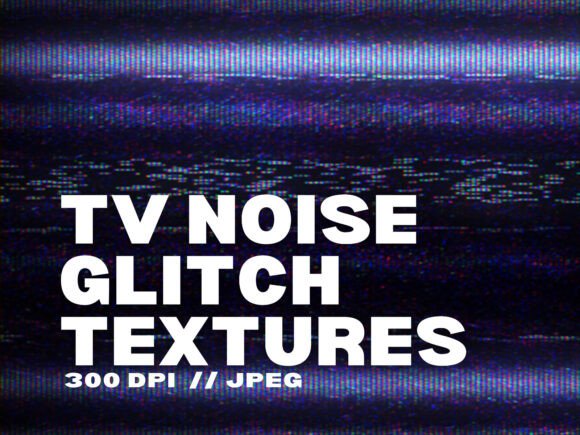
If you’ve ever spent time scrolling through design inspiration or editing a video that just needs that extra layer of grit, you’ve probably seen the retro-futuristic look of TV noise and glitch effects. That distorted, static-filled aesthetic instantly signals something digital, broken, or just a little off—and that’s exactly why it works so well for so many projects. With the collection called 10 TV Noise Glitch Textures, you get ten high-resolution JPG files (3000x2000 px at 300 DPI) that bring that analog interference look straight into your digital workflow. No plug-ins, no complicated filters, just clean overlays you can drop into any design software and start using right away.
Why Designers Reach for TV Noise Glitch Textures
Walk into any coffee shop or boutique store and you’ll see posters, menus, and packaging that borrow from the same visual language: grainy overlays, color shifts, and pixel fragmentation. It’s not just a trend—it’s a way to communicate imperfection and authenticity in a world of polished, AI-generated images. The 10 TV Noise Glitch Textures set gives you a shortcut to that vibe without spending hours building static from scratch. Whether you’re a graphic designer working on a festival flyer or a video editor crafting a YouTube intro, these textures let you achieve that cyberpunk or VHS-era look in minutes.
The practical appeal is obvious: instead of hunting for free stock images with watermarks or low resolution, you get a consistent batch of textures that all work together. They’re all the same size, same DPI, and ready to blend. That consistency matters when you’re layering multiple effects across a project. You’re not adjusting scale or resolution every time—you just drag, drop, and change the blend mode.
Graphic Design for Events and Branding
Imagine you need to design a poster for a local electronic music night. The vibe is dark, industrial, a little messy. You could use a clean sans-serif typeface on a black background, but that won’t grab attention. Add a TV noise glitch texture as an overlay, set to “screen” or “overlay” in Photoshop, and suddenly the poster feels alive. The static creates depth, the pixel breaks suggest motion, and the overall effect screams “this is not your average event.” That same approach works for flyers, social media ads, and even branded merchandise like t-shirts where the texture is part of the print design.
For small business owners, especially those selling streetwear or limited-edition drops, these textures differentiate your brand from the polished look of fast fashion. A logo on a hoodie that uses a glitch overlay feels more exclusive, more underground. It’s a subtle way to say your product is for people who appreciate the raw side of digital culture.
Video Editing and Cinematic Overlays
Video creators face the challenge of making content stand out in a crowded feed. A music video for a lo-fi track, a gaming montage, or a short film that needs a dystopian mood—all can benefit from a static overlay. The 10 TV Noise Glitch Textures are perfect as video overlays. In any NLE like Premiere Pro, DaVinci Resolve, or Final Cut, you can import the JPGs as still images and apply blending modes, or even animate them by panning the image across time. The result is a rolling wave of static that looks genuine, not like a cheap digital filter.
One scenario that comes up often: a content creator needs to transition between clips with a “glitch” effect. Instead of using an expensive plugin, you can crossfade between a clean clip and a TV noise texture, then dissolve to the next scene. It’s cheap, fast, and looks authentic because it uses real scanned noise patterns. For TikTok or Instagram Reels, a quick static flash at the start hooks viewers immediately. It signals that your video is about to deliver something edgy or unexpected.
Social Media Content and Brand Identity
Instagram influencers, marketers, and social media managers are always looking for ways to make static images pop. A product shot with a clean background can feel sterile. Drop a glitch texture over it at low opacity, and you add visual interest without hiding the product. The same applies to quote posts, announcement graphics, or story templates. The textures give you a cohesive aesthetic across your feed without needing to redesign everything.
For bloggers and educators who produce digital courses or workbooks, using these textures in section headers or background assets can make PDFS look more modern and less like typed documents. A landing page for an online course about digital art, for instance, could use a subtle static overlay to hint at the content’s tech-forward focus.
How Different Creators Benefit from the Same Set
The beauty of a universal resource like this is that one set of ten textures can serve wildly different purposes. A freelance graphic designer who primarily does brand identity work might use them sparingly—perhaps just on mood boards or presentation decks to give a hint of texture. They can also print them as full-bleed backgrounds for packaging prototypes.
Meanwhile, a digital artist working in Procreate will import the JPGs as clipping masks or texture layers for illustrations. The high resolution (3000x2000 px at 300 DPI) means you can scale them down without losing detail, or use just a portion of the texture for precise areas. For dystopian character portraits, layering a glitch texture over the subject’s face creates an immediate sci-fi feel.
Video editors working on gaming intros or live-stream overlays can rotate through the ten textures across different scenes, keeping the static fresh without repeating the exact same pattern. Because each file is unique, you avoid the visual burnout that comes from using the same stock overlay twice.
Small business owners in the fashion or tech space can repurpose the textures for social media ads and website banners. For example, a Shopify store selling refurbished electronics could use the textures to evoke a retro tech vibe that aligns with their inventory. The commercial use allowance means you can use them for branded content, marketing materials, and even products that you sell, without worrying about licensing.
What to Consider Before Downloading and Using
Before you start layering these textures onto every project, there are a few practical things to think about. First, file format. These are JPGs, which means they don’t have an alpha channel like PNGs would. To use them as overlays where you only want the static noise and not a white or black background, you’ll need to rely on blend modes. Photoshop’s “Screen” or “Overlay” are the usual choices. In Canva or Procreate, you can set the image to a blending mode within the app. It’s a tiny extra step, but it’s important to know if you’re used to PNGs with transparent backgrounds.
Second, resolution. The 3000x2000 size at 300 DPI is plenty for most screen and print work. If you're designing for billboards or large-format prints, you might need to scale up slightly, but for standard posters, flyers, social media graphics, and even t-shirt designs, they work out of the box. The DPI is high enough for professional print—so no worry about pixelation in a magazine layout.
Third, commercial use. The product description clearly allows commercial use, but it’s always wise to double-check the specific license terms provided with the download. If you’re planning to sell the textures themselves (as a standalone product), that’s usually not allowed—but using them in your own commercial projects, like client designs or branded products, is generally fine. Always read the fine print, but the set is designed for creative professionals who need to deliver polished work.
Another consideration: the aesthetic itself. TV noise and glitch textures aren’t for every brand or project. If you’re designing for a luxury hotel or a medical clinic, these textures will likely feel out of place. But for tech, gaming, nightlife, fashion, or any project aiming for a cyberpunk, dystopian, or retro vibe, they’re a perfect fit. Think about your target audience’s expectations before applying that grainy static.
Connecting Features to Real Outcomes
Instead of listing specs, let’s trace how a few features lead to practical benefits. 10 high-resolution JPG files means you’re not limited to one look. Use a different texture for each section of a website landing page to create a rhythm of static. Instant digital download means you don’t wait for shipping. A last-minute client request at 11 PM? Download, unzip, and start editing within minutes. That’s a lifesaver for freelancers who need to turn around projects fast.
Compatibility with all design software (Photoshop, Canva, Procreate, Affinity) means you don’t need to learn a new tool. Drag and drop works everywhere. Even if you only use a free tool like Photopea or GIMP, these JPGs open without a problem. The barrier to entry is zero beyond having an image editor.
Commercial use allowed directly supports business owners and marketers. You can use these overlays for client work, product packaging, social media ads for your own brand—all without extra fees. That adds genuine value beyond the creative .
Practical Workflow Ideas
Here are a few realistic ways to integrate the 10 TV Noise Glitch Textures into your everyday workflow, based on what creators actually do:
- Quick social templates: In Canva, create a template with one texture as a background at 20% opacity. Save it as a brand kit asset. Every time you need a gritty post, just swap out the main image and keep that static base.
- Video transitions: In your video editor, set a texture as a still image on a layer above your clips. Keyframe opacity from 0% to 100% over 10 frames, then back to 0%. That brief flicker simulates an analog glitch perfectly.
- Mockup presentations: For client proofs, apply a subtle static overlay to your screenshot of the design. It makes the presentation feel more like a final product than a raw file, which can help clients visualize the brand’s overall mood.
- Mood board backgrounds: Use the textures as background sheets for your mood boards in Photoshop or Figma. It ties disparate images together with a common visual theme.
Who Should Consider This Collection
This set is a natural fit for a broad range of users. Graphic designers who add effects often will appreciate having a ready library instead of hunting for textures each time. Video creators who produce intro sequences or lower thirds will find the overlays quick and effective. Small business owners who manage their own social media can elevate their posts without hiring a designer. Hobbyists experimenting with digital art on Procreate or Affinity will enjoy the instant aesthetic upgrade for their illustrations.
Even educators and bloggers can use these textures to create unique header images for articles or course modules. Instead of stock photos everyone has seen, a collage of text with a static overlay can visually represent concepts like “digital disruption” or “glitch in the system.”
If you’re someone who works with multiple types of media—graphics, video, print—the versatility of a single set of textures that are all high-res and uniform means you can rely on them across your whole workflow. That consistency reduces decision fatigue when you’re in a creative flow.
There’s also the cost factor. A single set of professional textures often costs the same as a couple of coffees, and you get instant access. No subscription, no monthly fee. For freelancers and side hustlers, that’s a budget-friendly way to add premium assets to your toolkit.
Final Thoughts Before You Use Them
TV noise and glitch textures are a powerful tool—not a gimmick. When applied thoughtfully, they can transform a flat design into something immersive. But like any effect, less is often more. Start with low opacity, let the texture breathe behind your main content, and only push it high when you want a strong statement. The 10 TV Noise Glitch Textures give you options; the best use comes from understanding the mood you want to set.
If you’re aiming for dystopian realism, pair the textures with desaturated colors and hard edges. For a retro VHS feel, combine them with chromatic aberration (color fringe) and a 4:3 aspect ratio. For a modern cyberpunk look, overlay on neon gradients and use dark mode UI elements. The textures work as a layer of authenticity that signals to your audience: this was made with intention, not a default filter.
Before you download, make sure the file format and resolution match your project’s needs. For screen work, even a lower DPI would work, but having 300 DPI means you can print without worry. Also, consider organizing the ten files in a folder with clear names (like “static_heavy”, “thin_lines”, “scanlines”) so you can quickly grab the right one in a deadline rush.
For most creators, the 10 TV Noise Glitch Textures set is a smart addition to a resource library. It saves time, offers variety, and unlocks a look that’s popular across media. Whether you’re a seasoned professional or just starting to experiment with digital effects, you’ll find immediate uses in posters, videos, branding, and beyond.