Burning Smoke Skull Background for Bold Designs
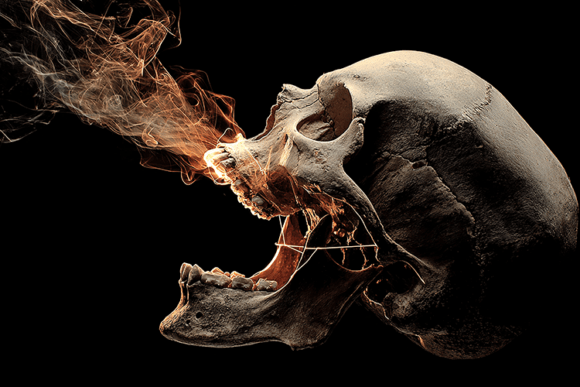
Few visual elements carry as much raw intensity as a realistic human skull engulfed in fiery smoke against a pitch-black backdrop. The Burning Smoke Skull Background delivers exactly that—a high-contrast, dramatic image that balances darkness with glowing, organic flame-like smoke. Whether you are designing a heavy metal poster, working on a gothic illustration, or searching for tattoo inspiration, this graphic asset offers a ready-to-use foundation that saves hours of compositing work. At 5824 x 3264 pixels, the file provides enough resolution for large prints, banners, and detailed digital compositions without losing sharpness or depth.
This article walks through what makes this background stand out, who can use it, where it fits best, and what to consider before adding it to your project.
What Makes This Skull Background Different
Skull imagery appears everywhere—from fashion to gaming, from album art to apparel. But a generic skull vector or low-resolution photo often falls flat when you need a professional, print-ready result. The Burning Smoke Skull Background combines realistic bone texture with a dynamic smoke effect that looks like it is moving. The skull does not just sit there; it exhales fiery smoke, and the lighting wraps around the surface in a way that feels three-dimensional.
The deep black background serves a dual purpose. It makes the glowing smoke pop visually, and it gives you flexibility when layering text, logos, or other design elements on top. Because the background is already dark and clean, you can drop it into a web layout, a T-shirt mockup, or a poster file with minimal adjustment.
Key characteristics include:
- Realistic human skull anatomy with detailed bone shading and contours
- Glowing smoke trails that radiate outward with orange and red tones
- High contrast lighting that emphasizes depth and mood
- Black background that minimizes clipping and blending work
- Print-ready resolution at 5824 x 3264 pixels
Who Needs a Burning Smoke Skull Background
At first glance, this might seem like a niche asset for horror enthusiasts only. But the actual audience is wider than you might expect. Anyone working on projects that demand an edgy, dramatic, or rebellious aesthetic can benefit from having this file in their library.
Graphic Designers and Digital Artists
If you create posters, flyers, or social media graphics for events like Halloween parties, metal concerts, or gothic festivals, this background gives you an instant focal point. Instead of building a skull from scratch in Photoshop or Illustrator, you can place it behind typography or other imagery and adjust the blending mode to fit your palette. The high resolution also means you can crop into specific areas—like the eye sockets or the smoke plume—without losing quality.
Tattoo Artists and Enthusiasts
Skull tattoos remain a staple in American traditional, neo-traditional, and blackwork styles. A realistic reference image helps tattoo artists plan shading, placement, and smoke flow around the contours of the body. The Burning Smoke Skull Background provides a clear source of inspiration for smoke effects that wrap around bone structure. You can study how the light hits the teeth, the nasal cavity, and the cheekbones to replicate that depth in ink.
Gaming and Streaming Creators
Game developers, Twitch streamers, and YouTube content creators often need channel art, overlay backgrounds, or thumbnail images that grab attention. A dark skull with fiery smoke fits perfectly into horror games, battle royale titles, or dark fantasy themes. You can overlay your logo or username on the smoke area, and the high contrast ensures readability even at small sizes.
Small Business Owners and Marketers
Apparel brands, skateboard companies, or niche clothing lines targeting alternative lifestyles can use this background for product mockups, lookbooks, or website banners. It also works well for limited-edition drops around Halloween or special events. The print-ready quality means you can send the file directly to a printer for posters, stickers, or hang tags without worrying about pixelation.
Practical Use Cases and Real Examples
Let us move beyond theory and look at how you might actually apply this background in a real project.
Poster Design for a Metal Show
Imagine you are designing an A3 poster for a local death metal band. You open the Burning Smoke Skull Background in your editing software, set the band name in a bold, distressed font across the top, and list the date and venue near the bottom. The glowing smoke draws the eye upward, and the black background makes white or red text stand out immediately. You do not need to add extra texture or grunge effects because the image already carries that atmosphere.
YouTube Thumbnail for a Horror Game
For a video about a scary indie game, you could crop the skull to focus on the left eye and the smoke trail. Place your facecam or game logo on the right side. The dramatic lighting instantly signals danger or suspense, which increases click-through rates. The high resolution also lets you export a thumbnail at 1920 x 1080 pixels without any loss of detail.
T-Shirt Mockup
Using a mockup template, you can place the skull on a black or white shirt. The fiery smoke creates a natural composition that does not require additional framing. If your print shop requires a transparent background, you can remove the black backdrop easily because the skull and smoke have clear, hard edges with no messy gradients blending into the dark.
Website Hero Banner
A brand that sells gothic home decor or occult-themed merchandise might use this background as a hero section image. With a dark overlay and light text, the skull becomes a dramatic but not overwhelming centerpiece. The 5824 pixel width ensures it looks crisp on retina displays and large monitors.
Important Considerations Before Using the File
Even a high-quality asset like this has nuances. Here are a few things to keep in mind before you start designing.
Color Palette Compatibility
The image relies on deep blacks, warm orange-red smoke, and cool bone tones. If your project uses pastels, neon greens, or very bright colors, the skull may clash or feel out of place. Test the background with your intended palette early in the design process. You can always adjust the saturation or apply a gradient map to tie everything together.
File Format and Transparency
The file is a JPG, which means it does not include an alpha channel. The black areas are solid pixels, not transparency. If you need to place the skull over a different background color, you will have to remove the black manually using tools like the magic wand, color range selection, or a layer mask. For most users, this is a quick step, but it is worth noting if you expected a PNG with transparent background.
Print vs. Digital Use
At 5824 x 3264 pixels, this background is ideal for high-quality prints up to poster size or larger, depending on your desired DPI. For digital use, you may need to scale the image down to avoid oversized file sizes on your website or social media. Always keep a copy of the original file untouched, and work from duplicates when resizing.
Licensing and Usage Rights
Always check the licensing terms provided with your purchase or download. Some stock images restrict commercial use, require attribution, or prohibit use in certain types of products like merchandise for resale. If you plan to use the Burning Smoke Skull Background in a commercial project, confirm that your license covers that specific application.
Why Resolution Matters for Professional Results
A common mistake beginners make is using small, low-resolution images and expecting them to look sharp in print. A file that looks fine on social media may appear blurry or pixelated on a poster or banner. The 5824 x 3264 px resolution of this background eliminates that problem. At 300 DPI, you can print it at roughly 19 x 11 inches. At 150 DPI, you can go even larger for trade show displays or wall murals. This flexibility makes the asset suitable for both experienced designers and those just starting out.
Additionally, the high resolution allows for non-destructive cropping. If you only need a portion of the smoke effect for a composition, you can crop in and still retain a printable image. This is especially useful when you want to create multiple assets from a single source file.
Getting the Most Out of the Smoke Effect
The glowing smoke is arguably the most dynamic element in this background. When used strategically, it adds movement and energy to an otherwise static image. Consider these approaches:
- Type integration: Place text directly in the smoke trail and use a blending mode like screen or overlay to make the letters glow.
- Layer duplication: Duplicate the skull layer, set the duplicate to a soft light blend, and blur it slightly to create a subtle halo effect around the bone.
- Color grading: Apply a warm gradient map to the entire image to intensify the fire tones, or a cool blue gradient for an eerie, ghostly variation.
- Masking: Use the smoke as a mask for other textures or images so that the smoke pattern shows through a second design element.
These techniques work in most editing software, including Photoshop, GIMP, Affinity Photo, and Canva. Even if you are not a power user, you can achieve good results with basic layer adjustments.
Final Thoughts on This Design Asset
The Burning Smoke Skull Background is more than just a stock image. It is a versatile building block for anyone who wants to inject intensity, darkness, and drama into their work without spending hours on complex illustration. Whether you are a freelancer preparing a client presentation, a hobbyist making custom apparel, or a marketer planning a Halloween campaign, this file saves time while delivering professional quality.
Because the asset is print-ready and high-resolution, it bridges the gap between digital convenience and physical output. You can go from concept to print in a single afternoon. Just remember to account for the JPG format, test your color palette, and verify your licensing terms before publishing or selling your final work.
If you are looking for a skull background that does not look generic or flat, this one deserves a place in your toolkit. The combination of realistic bone detail, fiery smoke, and dramatic lighting gives you a strong foundation for any dark-themed project.