Cozy Gamer Girl Teardrop Earrings: Getting the Most from Your Sublimation Designs
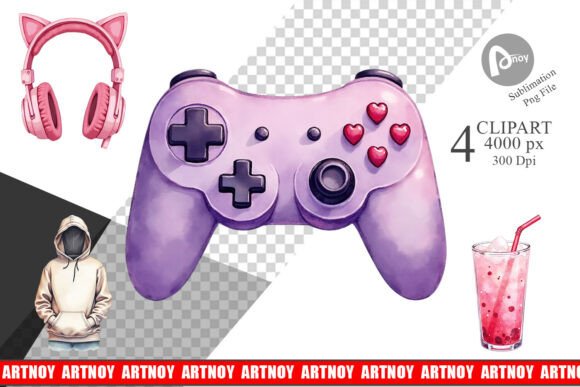
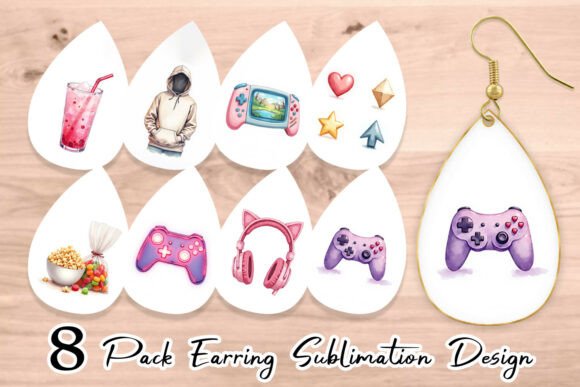
If you create accessories for the growing community of women who love gaming but also want a soft, pastel aesthetic, you have likely come across the Cozy Gamer Girl Teardrop Earrings design set. These PNG files combine a pastel gaming headset, a cute controller, and neon sign motifs into earring-shaped templates. The bundle promises easy customization: you can add your own text or design elements into the background. That flexibility is exactly what makes this product so appealing for streamers, small business owners, and hobbyists who make sublimation crafts.
But owning the PNG file is only half the battle. Many creators buy these beautiful Teardrop earring sublimation design Bundle PNG files only to end up with blurry prints, awkwardly placed text, or earrings that simply do not sell. The difference between a professional-looking accessory and one that looks homemade often comes down to a handful of avoidable mistakes.
Mistaking the File Size for a Finished Product
A common misunderstanding is that the 600x900 px, 300 DPI PNG is ready to print as-is with zero adjustments. While the file is high-resolution for its intended 2 x 3 inch format, it is a background design. The element you add on top—whether that is a gamertag, a tiny heart, or a neon phrase—needs to be placed thoughtfully.
Many beginners load the PNG, drop text in the center, and hit print. The result often looks crowded. The headphones or controller motif gets partially covered, and the earring loses its visual balance. Instead, treat the background as a stage. Position your added content in the negative space around the central graphic. The left side of the teardrop, or a soft gradient area near the bottom, usually provides room for a short word or initial without hiding the best parts of the design.
Overlooking the 600x900 Pixel Constraint
Eight high-resolution files at 300 DPI sounds generous, and it is. But 600x900 pixels at 300 DPI works out to exactly 2 inches by 3 inches. That is the size of a small teardrop earring blank. Some creators try to scale the PNG larger for bigger blanks, like a 4-inch acrylic charm or a wide tumbler. The moment you scale up beyond 110 percent, the image becomes pixelated.
If you want to use these designs on larger surfaces, you need to work in vector-based software or use an image upscaler before sublimation. A better approach is to keep these PNGs for blanks that match their native dimensions. A 2x3 inch metal teardrop, a small resin charm, or a tiny cosmetic pouch are ideal. Trying to force the design onto a full-size T-shirt or a large tote bag will only disappoint customers who expect crisp details on the controller buttons and headset padding.
Ignoring Color Shifts in Sublimation
The pastel appeal of the cozy gamer girl aesthetic depends on soft pinks, mint greens, lavender, and muted yellows. The PNG files show these colors beautifully on your screen. But sublimation ink behaves differently on various materials. A common mistake is printing the design onto regular sublimation paper without first checking your printer's color profile.
When those pastels hit a polyester-coated earring blank, they often come out darker or more muted than expected. A light mint can turn into a dull sage. The cute pastel controller can look almost gray if the colors shift.
Test one print on a scrap blank before running a batch. If your printer tends to push colors warm, reduce the yellow and magenta slightly in your design software. Alternatively, use a ICC profile specifically for your printer and paper combination. This small adjustment keeps the cozy, soft look intact and saves you from wasting eight beautiful designs on ruined blanks.
Forgetting That the Earrings Need a Backing
It sounds obvious, but many first-time sublimation crafters focus entirely on the front face of the teardrop earring. They press the design perfectly, get the colors right, and then realize they need to attach earring posts, jump rings, or hypoallergenic hooks. The Cozy Gamer Girl Teardrop Earrings bundle gives you the artwork. It does not include instructions on assembly hardware.
If you sell these to customers who have sensitive ears, you need nickel-free or surgical steel findings. Gold or silver-plated hooks might look nicer but can cause reactions in some buyers. Also, think about the orientation of the design. Make sure the teardrop hangs the way you intended. If the design includes text, confirm that the text reads correctly when the earring hangs naturally. Print a mirrored test if necessary, especially for sublimation on transparent acrylic where both sides show.
Neglecting the Background Space for Text
One of the biggest selling points of this bundle is the ability to add design or text into the background. Yet, time and again, crafters choose fonts that clash with the pastel gaming theme. A heavy, black sans-serif font will overpower the delicate headset and controller graphics. A script font that is too thin may disappear after sublimation.
Stick with rounded, friendly typefaces. Soft bubble letters, a neat sans serif with rounded corners, or a light handwritten font work well. Keep the text color within the same pastel palette. A dusty rose pink or a soft lavender will blend harmoniously. White text on a pastel background can look clean but make sure the background area is light enough to provide contrast. Test by printing on plain paper first to see how the text reads at actual size.
Misunderstanding the Value of 300 DPI
Some buyers see 300 DPI and assume the file is suitable for any commercial print job. For earring-sized sublimation, 300 DPI at 2x3 inches is exactly correct. But if you plan to use the design in digital thumbnails, social media posts, or Etsy listings, 300 DPI is overkill and will slow down your browser or editing software. You can safely reduce the resolution to 72 DPI for web use and keep the pixel dimensions the same.
On the other hand, do not compress the PNG to a low-quality JPEG for printing. The PNG format preserves transparency and fine edges, which matters for the delicate lines in the headset and controller. Saving as JPEG can introduce artifacts around the earring borders, making the design look messy after cutting.
Rushing the Transfer Process
Sublimation requires patience, and this design set rewards careful work. A typical mistake is pressing the earring blank at the wrong temperature or for the wrong duration. Because teardrop earrings are small, they heat up quickly. Too much heat can cause the pastel colors to bleed into each other, turning your cozy gamer girl aesthetic into a muddy mess.
Follow the temperature guidelines for your specific blank, but as a rule of thumb, start at 380°F for 45 seconds with medium pressure. Check the results and adjust from there. If the colors come out too faint, increase time rather than temperature. If they look blotchy, reduce pressure. Keep a notebook of what works for each blank type so you can repeat successful batches.
What to Check Before You Buy
Not all Teardrop earring sublimation design Bundle PNG files are created equal. Before purchasing, confirm that the set includes the exact motifs you want. The trendy collection should feature a pastel gaming headset, a cute controller, and neon signs. If you are buying for a specific customer base, make sure the designs match the cozy, pastel vibe rather than a neon-rave or dark gaming aesthetic.
Also check that the commercial license covers what you need. Some bundles allow unlimited sales of physical products, while others restrict you to a certain number. If you run a shop on Etsy or Amazon Handmade, you need a license that permits commercial use. The product page should state this clearly. When in doubt, message the seller and save the response as proof.
Finally, look at the file format. High-resolution PNG at 300 DPI with transparent backgrounds is ideal. Avoid bundles that offer only JPG or low-resolution images. They will not sublimate cleanly at 2x3 inches, and the earrings will look pixelated.
A Better Approach for Beginners
If you are new to sublimation or earring making, start with one design from the bundle rather than printing all eight at once. Load the PNG into your editing software. Add a single word or a small icon in the background space. Print onto sublimation paper, cut closely around the earring shape, and tape it securely to your blank. Press, peel, and evaluate.
This method lets you learn the quirks of your printer, your blank, and your heat press without wasting material. Once you get a clean, vibrant result, repeat the process with the other designs. Over time, you will develop a workflow that consistently produces crisp, cute earrings that appeal to the cozy gamer audience.
The Cozy Gamer Girl Teardrop Earrings bundle offers a solid foundation for creating streaming-themed accessories that stand out. By avoiding the common pitfalls around resizing, color management, hardware, and text placement, you can turn these PNG files into products that customers actually want to wear. Test, adjust, and keep the pastel aesthetic front and center. That is the path to making sublimation earrings that look as good in person as they do on your screen.