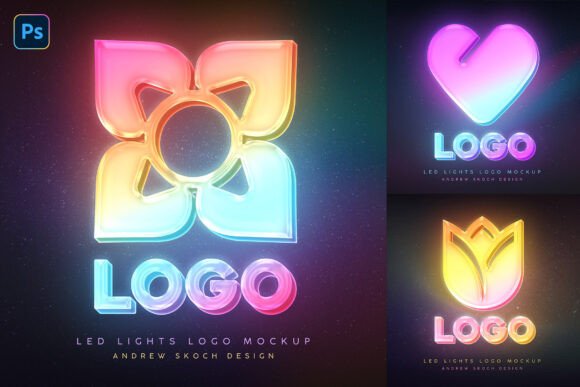
LED Logo Photoshop Mockup: A Practical Tool for Neon Branding and Eye-Catching Design
If you have ever tried to create a realistic neon sign effect from scratch in Photoshop, you know how time-consuming it can be. Getting the glow just right, matching the light spread, and making the colors pop without looking artificial takes patience and skill. That is where an LED Logo Photoshop Mockup becomes more than just a template—it becomes a shortcut to professional results.
This set includes 3 high-quality PSD templates that simulate LED light effects and gradient glows, giving your logo a vibrant, electrifying look. With 6 PSD files, 6 JPEG previews, and a helpful PDF guide, the package is designed for quick drag-and-drop customization. Whether you are a freelancer preparing a client proposal or a small business owner exploring signage options, this mockup offers a fast path to realistic LED visuals without the steep learning curve.
What the LED Logo Photoshop Mockup Actually Does
At its core, this mockup replaces the need to build neon effects from zero. Each PSD file comes with Smart Object layers, meaning you open the file, double-click the Smart Object thumbnail, paste your logo, save, and the template applies the LED lighting automatically. The files are 3000 x 2000 pixels at 300 DPI, which gives you sharp results for both digital presentations and print materials.
The three templates feature different LED light colors, so you are not stuck with a single look. One might offer a cool blue neon tone, another a warm magenta or electric green. The gradient lighting adds depth, making the logo look like it is mounted on an actual surface rather than floating in space. For anyone who needs a futuristic, gaming, or nightlife aesthetic, this kind of mockup delivers a polished result in minutes rather than hours.
Who Benefits from This Mockup and Why
Different people reach for LED mockups for different reasons. Below are several real-world scenarios that show how this tool fits into actual work and projects.
Freelance Graphic Designers Saving Time on Proposals
As a freelance designer, you often need to present multiple logo variations to a client. Showing a logo on plain white or a generic gradient does not sell the vision the way a mockup in a real-world setting does. With the LED Logo Photoshop Mockup, you can place a client's logo in a neon storefront or event signage context within minutes. The client sees the logo glowing, sees the reflection and the gradient spread, and immediately understands the impact.
Instead of spending 40 minutes building a neon effect for each logo version, you spend 2 minutes per file. That time saving adds up fast when you have multiple concepts to present. And because the files come with organized layers, you can tweak brightness or color overlay without breaking the effect.
Small Business Owners Exploring Signage Options
If you own a café, a barber shop, or a boutique retail store, you might be considering LED signage for your storefront. Ordering a physical sign is expensive, and you want to visualize how your logo will look before committing. This mockup gives you a realistic simulation of what your logo would look like as an illuminated sign.
You can test different LED colors: does your logo look better in warm amber or cool white? Does the glow work well with your brand colors? The template lets you answer these questions without any fabrication costs. You can even share the mockup with a sign manufacturer to communicate the exact look you want.
Game Developers and Streamers Building a Brand Identity
The gaming community loves neon aesthetics. If you are an indie game developer designing a logo for your studio or a streamer creating an overlay logo, the LED effect adds a professional, futuristic vibe that resonates with audiences. The gradient glow and vibrant colors in this mockup set make your logo feel like it belongs on a gaming PC case, a live stream intro, or a tournament banner.
Because the templates are high resolution, you can use the output directly for social media headers, YouTube banners, or Twitch panels. The neon look helps your brand stand out in crowded feeds where bright, glowing visuals capture attention faster than flat designs.
Event Organizers and Nightlife Promoters
Concerts, club nights, and festivals rely heavily on visual branding that communicates energy and excitement. An LED mockup lets promoters and event organizers preview how a logo will look on stage backdrops, wristbands, or digital flyers. The electrifying glow in these templates matches the high-energy atmosphere of nightlife events.
Instead of hiring a designer to create a custom neon effect for every poster, the mockup allows in-house teams to generate consistent, high-quality visuals across multiple pieces of collateral. The uniform style also builds recognition: if every event graphic uses the same LED treatment, the audience starts associating that look with your brand.
Educators and Workshop Instructors Teaching Design Principles
If you teach Photoshop or graphic design, this mockup serves as a great teaching tool. You can use it to demonstrate how Smart Objects work, how lighting affects brand perception, and how mockups streamline client presentations. Students see immediate results, which keeps them engaged.
The well-organized layers also make it easy to walk through the structure of a professional PSD file. You can show students how to adjust gradient colors, modify opacity, or add additional glow effects without starting from scratch. It is a practical, hands-on way to teach real-world design workflows.
Bloggers and Content Creators Needing Visual Impact
Bloggers who review products or create tech-related content often need compelling visuals for thumbnails or featured images. Placing a blog logo or channel name inside an LED mockup gives it that cinematic, high-tech feel that drives clicks. The high resolution and crisp details mean the output holds up even when scaled down for social media or embeds.
Instead of searching for stock images or using basic text overlays, you can generate a unique, branded graphic in a few minutes. Over time, having a consistent neon style becomes part of your visual identity, making your content instantly recognizable.
What to Consider Before Using the Mockup
While this template set is easy to use, a few practical considerations will help you get the best results.
Your Logo Design Matters for the Effect to Work Well
LED mockups work best with logos that have clear shapes and moderate complexity. If your logo has very thin lines or intricate details, the glow might bleed and make it look blurry. Bold logos with distinct forms benefit most from the gradient lighting. Consider simplifying your logo or creating a version specifically for neon applications.
The mockup simulates how light spreads around a physical sign, so logos with large open spaces or negative space also tend to look striking. Test a few variations to see which one reads best at a distance.
Choose the Right LED Color for Your Context
The set includes three different LED color templates. Think about where the image will be used. A gaming channel might want a cyan or electric blue glow. A coffee shop sign might look better in warm amber. A tech startup might prefer a clean white or cool magenta. Matching the LED color to your brand's existing palette ensures consistency across all your materials.
You can also adjust the color further within Photoshop by adding adjustment layers or tweaking the hue. But starting with a template that already leans toward your desired tone saves time.
Resolution and Output Use Cases
At 3000 x 2000 pixels and 300 DPI, the mockup works for both digital and print. You can use the output for social media posts, website headers, banners, flyers, or even small signage mockups. However, for large format printing like billboards or storefront signs, you may need to scale the file up or work with vector versions of your logo for best results.
For digital use, the 300 DPI means sharp images even on retina displays. So whether you are uploading to Instagram or embedding in a PDF portfolio, the visuals remain crisp.
How the Features Translate to Real Outcomes
Instead of listing features mechanically, here is how they connect to actual benefits.
- Smart Object replacement means you spend seconds updating files instead of minutes rebuilding effects. For designers handling multiple client revisions, this adds up to hours saved per project.
- Gradient lighting creates depth that makes your logo look like a physical object rather than a flat graphic. This helps clients visualize the logo in actual spaces.
- High resolution at 300 DPI gives you flexibility. You can print postcards or use the same file for a website hero section without quality loss.
- Well-organized layers let you fine-tune elements like background, glow intensity, or reflection without damaging the core effect. This is helpful if you want a subtle look for a professional brand or a bold look for a nightlife event.
- 6 PSD files with different colors give you options without forcing you to manually change everything. If a client wants to see a logo in both blue and pink, you have ready templates for both.
Final Thoughts on the LED Logo Photoshop Mockup
The LED Logo Photoshop Mockup fills a specific need: it turns flat logos into vibrant, illuminated visuals with minimal effort. Whether you are a freelancer preparing a pitch, a business owner exploring signage, a gamer building a brand, or an educator teaching design, this set gives you a reliable tool for realistic neon effects.
The key is to use it where it adds value. Do not just add a glow because you can. Think about the context: Will the LED look help your audience understand the brand's energy? Does the color fit the industry? Will the visual stand out in a feed or on a storefront? When the answer is yes, this mockup delivers quickly and consistently.
By focusing on real use cases and practical outcomes, the LED Logo Photoshop Mockup becomes more than a template—it becomes a strategic asset for anyone who needs strong, visual brand communication. Give your logo the electrifying treatment it deserves, and let the light do the work.