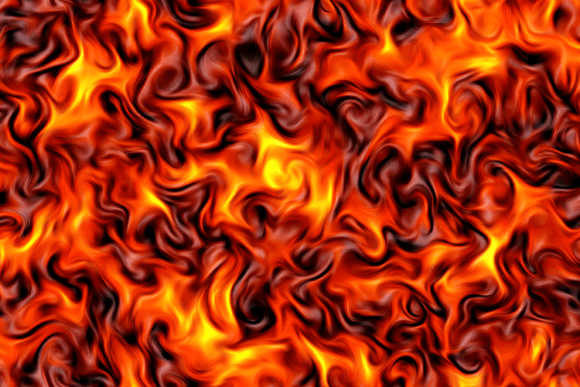
Abstract Flame Swirl Texture Background for Creative Projects
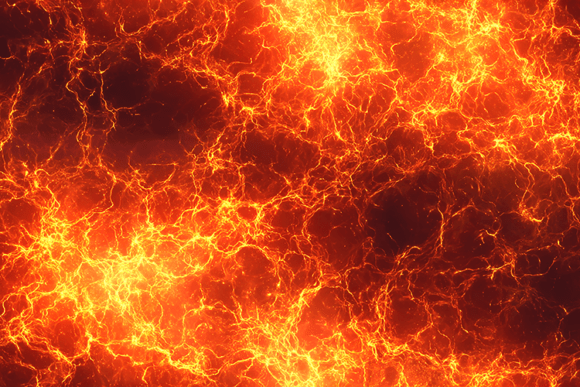
An Abstract Flame Swirl Texture Background is a digital image file that captures the look of swirling, flowing flames in vivid shades of orange, red, and yellow. Unlike a simple gradient or solid color, this texture mimics the fluid, molten movement of fire, creating a sense of energy and motion. The version offered at 5824 x 3264 pixels is a high-resolution JPG file that is print-ready, meaning you can use it for large format prints without pixelation or loss of detail. This type of background is essentially a versatile visual tool—a ready-made canvas of fiery color and form that saves you the trouble of designing such an effect from scratch.
The core appeal lies in its balance between abstraction and recognizability. You see flame-like shapes, but they swirl and blend in ways that real fire rarely does, giving the image an artistic, almost surreal quality. This makes it suitable for a wide range of uses, from a striking wallpaper on your phone to the backdrop of a fantasy book cover or a promotional poster for a gaming event. For creators, it means having a dramatic, high-impact visual element ready to drop into a design project.
Who Benefits from This Type of Background
If you are a graphic designer, a digital artist, a content creator, or even a small business owner looking to make marketing materials stand out, an abstract flame swirl texture can serve as a powerful foundation. The intensity and warmth of the colors naturally draw the eye, making them ideal for grabbing attention in a crowded feed or on a printed flyer.
For beginners who may not yet have advanced skills in creating complex textures from scratch, this file provides a professional-grade starting point. You can overlay text, blend it with other images, or use it as a background that already has visual depth and interest. It removes the intimidation of building a complex effect yourself and lets you focus on composition, messaging, and other creative decisions.
Freelancers and hobbyists working on personal projects—like custom phone cases, sublimation tumblers, or fantasy-themed artwork—will appreciate that the file is ready to print. The size and resolution mean you can produce wall art, posters, or even fabric prints without worrying about quality degradation. Essentially, this background serves a wide spectrum of needs: from professional commercial use to personal crafting.
Practical Characteristics That Matter
Several specific characteristics make this texture particularly valuable. The swirling, fluid pattern means the background has a sense of organic movement. It does not look static or flat. This can add a dynamic quality to any design, whether digital or printed. The fiery color palette—orange, red, yellow—is emotionally warm and energizing. These colors are associated with passion, urgency, creativity, and power. Using them in a design can evoke strong feelings without the need for additional visual elements.
The high resolution of 5824 x 3264 pixels is a key practical detail. At this size, you can print the image at large dimensions—think posters, banners, or even fabric panels—while retaining sharpness. For digital use, you have plenty of pixels to work with, so cropping, scaling down, or using it as a full-screen wallpaper will not compromise image quality. The JPG format is universally compatible with design software, printing services, and device operating systems, so you can open and use it immediately.
Another important aspect is the abstract nature of the flames. Because the shapes are not literal, realistic fire, the background can work in contexts where actual flames might feel out of place. It is stylized, artistic, and versatile. You could use it for a music festival poster, a motivational quote graphic, a fantasy book cover, or as a backdrop for product photography. The abstraction allows the viewer to read the image as "energetic and warm" rather than "dangerous or destructive."
What Problems Does It Solve for Creators
One common challenge for designers and hobbyists alike is finding visually compelling backgrounds that are immediately usable without modification. Creating a complex flame-like texture from scratch requires skill, time, and the right software. This file eliminates that step. It solves the problem of needing a dramatic, warm-toned background quickly for a deadline-driven project.
Another issue is print quality. Many images found online are too low-resolution for professional printing, leading to blurry or pixelated results. The specified size ensures that even large prints will look crisp and professional. This is especially important for small business owners or entrepreneurs who sell printed products—posters, art prints, sublimated merchandise—and need to maintain a high standard of quality to satisfy customers.
For marketers and bloggers, creating visually consistent social media content can be time-consuming. Having a library of high-quality textures like this one allows you to quickly generate backgrounds for quote cards, announcements, or promotional banners. The fire theme naturally fits content related to motivation, intensity, transformation, or seasonal promotions (like New Year or summer campaigns).
Realistic Use Cases and Applications
Let us consider a few concrete scenarios. A small business owner who sells custom tumblers through an online shop can use this background as the base design for a sublimation print. The swirls and colors transfer onto the metal surface, creating an eye-catching product that appeals to customers who like bold, fiery aesthetics. The high resolution ensures the print is smooth and detailed.
An independent game developer might use the image as the backdrop for a game menu screen, a character selection interface, or a promotional key art. The molten effect suggests power, magic, or a volcanic world, instantly communicating the game's mood. With a few overlays and text, the background becomes a complete visual.
An educator creating classroom posters about volcanoes, energy, or even color theory could use the flame swirl texture to make the poster more engaging for students. The visual does the heavy lifting of capturing attention, allowing the teacher to focus on the information content.
For a freelance graphic designer, this file becomes part of a toolkit. You might use it as a layer in a composite image, applying blending modes to integrate it with other elements. You could also use it as a background for a client's website header, a social media banner, or a print advertisement for a brand that wants to convey heat, speed, or passion.
Hobbyists and crafters watercolor-style painting? No need. This digital texture can be printed on fabric, used in scrapbooking, or applied to a variety of paper crafts. The abstract flames add a dramatic flair without requiring specialized artistic skill.
Important Considerations Before Using the Texture
While this background is highly versatile, a few factors are worth considering. The intensity of the colors can overwhelm other design elements if not balanced. If you plan to add text or detailed graphics on top, you may need to darken, blur, or reduce the opacity of the background in your design software to ensure readability. Alternatively, you could place a semi-transparent overlay (like a dark gradient) between the texture and your foreground elements.
Another consideration is the rights and licensing of the file. Since this is described as a print-ready file for creative projects, make sure you understand whether it is licensed for commercial use if you intend to sell products featuring the image. This is standard practice for any purchased or downloaded creative asset, and it ensures you stay within legal boundaries.
The subject matter and emotional tone also deserve thought. A fiery background naturally evokes strong emotions and may not suit every brand or project. If your client's identity is calm, cool, or minimalist, the intensity of orange and red may clash with their messaging. Always consider the context and audience before using such a bold visual element.
From a technical perspective, although the JPG format is widely compatible, it does not support transparency. If you need to isolate parts of the flame pattern or layer it in a way that requires a transparent background, you will need to use photo editing software to manually remove areas or convert the file to a format like PNG. The high resolution is excellent for print, but it also means the file size is large, which may affect upload or download times for digital use.
Getting the Most Out of the Texture
To maximize the value of this background, think of it as a foundation element, not a finished design. Use it as a layer in Photoshop or a similar tool, and experiment with blending modes like Overlay, Screen, or Multiply to integrate it with other textures, colors, or photos. You can also adjust the hue and saturation to match a specific brand palette if the original colors are too warm or intense.
For print projects, always test a small sample first if possible, especially when using sublimation or other transfer methods. The final result can vary depending on the printing process, the material type, and the printer's color calibration. The high resolution gives you flexibility, but color accuracy still depends on your workflow.
If you are a beginner, do not be afraid to start simple. Place the image as a full-screen background on a poster, add a headline in large white or black lettering, and you already have a striking design. As you gain confidence, you can explore more complex compositions—multiplying the texture with other images, using masks to blend it partially, or combining it with geometric shapes for a modern look.
Ultimately, an Abstract Flame Swirl Texture Background is a tool that saves time and expands creative possibilities. Whether you are designing for profit, for passion, or for education, having a vivid, high-quality, ready-to-use texture in your library means you are never more than a few clicks away from a visual foundation that commands attention. The key is to use it thoughtfully, respecting both its strengths and its intensity, and letting it serve your larger creative vision.