Mastering Lightning Overlays: How to Electrify Your Digital Art and Photography
If you have ever looked at a dramatic storm photograph or a fantasy scene crackling with energy, you have likely wondered how artists create such striking effects. The secret often lies in a simple yet powerful tool: the lightning overlay. These high-resolution assets allow designers, photographers, and hobbyists to add realistic bolts of electricity to their work without waiting for a thunderstorm or risking dangerous conditions. In this article, we will explore what lightning overlays are, why they matter, how to use them effectively, and how they fit into modern creative workflows. Whether you are a beginner experimenting with photo editing or a seasoned professional looking for new inspiration, understanding these overlays can open up a world of electrifying possibilities.
What Exactly Are Lightning Overlays?
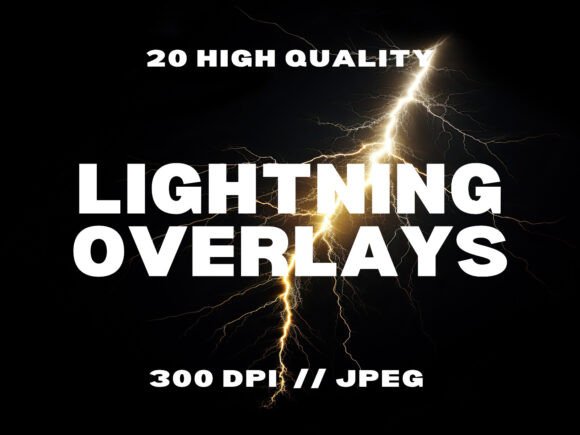
A lightning overlay is a transparent or semi-transparent image file that contains a photographically captured or digitally rendered lightning bolt. These files are typically saved in a format like JPG, PNG, or TIFF and are designed to be layered onto another image using editing software. When placed correctly, the overlay blends with the background, giving the illusion that the lightning was part of the original scene. The best overlays are high-resolution (often 300 DPI or higher) and capture the intricate branching, glowing core, and atmospheric glow of real lightning.
Lightning overlays come in packs, and a well-curated collection might include 20 or more distinct strikes. Each bolt has a unique shape, intensity, and direction, allowing creators to choose the perfect match for their composition. Because they are digital files, they can be resized, rotated, flipped, and color-adjusted without losing quality. This versatility makes them indispensable for anyone working in digital art, graphic design, or photography.
Adding Drama and Atmosphere
Lightning is one of nature's most awe-inspiring phenomena. It instantly conveys power, danger, unpredictability, and raw energy. In visual storytelling, adding a lightning strike can transform a mundane image into something memorable. A dark sky becomes a storm. A cityscape becomes a thriller. A portrait becomes a fantasy. The overlay gives the creator control over exactly where the bolt strikes, how bright it is, and how it interacts with the rest of the scene.
Saving Time and Increasing Safety
Capturing real lightning with a camera is difficult. It requires perfect timing, expensive equipment, and often dangerous weather conditions. Even then, the resulting bolt might not have the ideal shape or position for your project. Lightning overlays eliminate these challenges. You can access a library of perfectly captured strikes instantly, from the safety of your workspace, and at any time of day or night. This efficiency is especially valuable for professionals working under tight deadlines.
Enabling Creative Freedom
With overlays, you are not limited to what nature provides. You can combine multiple bolts, change their colors (from natural white-blue to fantasy purple or red), adjust opacity to create a subtle glow, or use blending modes to integrate them seamlessly. This creative freedom allows you to build scenes that would be impossible to photograph in reality.
How Lightning Overlays Fit into Modern Creative Work
Lightning overlays are used across a wide range of creative fields. Let us explore some of the most common applications and how they enhance the final output.
Photo Editing and Enhancement
Photographers often use overlays to add storm effects to landscape, urban, or portrait shots. A wedding photo taken on a sunny day can be reimagined as a dramatic elopement under a stormy sky. Real estate photographers might use subtle lightning to give a property a moody, cinematic feel. The key is to match the lighting and color temperature of the overlay with the original image. If the photo is warm-toned, a slightly yellow or orange lightning glow can look more natural than a cold blue bolt.
Digital Art and Fantasy Illustration
Digital artists are perhaps the most enthusiastic users of lightning overlays. In fantasy and sci-fi art, lightning is a common element for depicting magic, alien technology, or supernatural powers. An artist painting a wizard casting a spell can add a lightning overlay around the wizard's hand to visualize the magic. For a sci-fi scene, multiple bolts can be layered to create a glowing energy shield or a weapon discharge. The overlay serves as a starting point that the artist can paint over, distort, or colorize further.
Graphic Design for Marketing and Branding
Graphic designers use lightning overlays to create attention-grabbing posters, banners, social media graphics, and event flyers. A music festival poster for a rock or electronic band might feature a lightning bolt as a central visual element. For product launches, lightning can convey excitement and innovation. However, it is important to use the effect tastefully. Too much intensity can overwhelm the message, while a well-placed strike can elevate the design.
Video Thumbnails and Streaming Assets
On platforms like YouTube, Twitch, and TikTok, video thumbnails are critical for click-through rates. Gaming channels, in particular, benefit from high-energy visuals. A lightning overlay can be used on a thumbnail to suggest an intense battle, a shocking plot twist, or an electrifying moment. Streamers also use lightning overlays in their channel art, alerts, and background visuals to create a distinctive brand.
Print Projects and Scrapbooking
Even in the physical world, lightning overlays have found a home. Scrapbookers and print designers can incorporate them into layouts for dramatic effect. A page documenting a storm-chasing adventure or a fantasy-themed party can feature lightning as a decorative element. High-resolution overlays (300 DPI) ensure crisp printing without pixelation.
Common Misunderstandings and How to Avoid Them
Despite their popularity, lightning overlays are sometimes misunderstood. Let us clear up a few common assumptions.
Misunderstanding 1: Overlays always look fake.
This is only true if they are used carelessly. The secret to realism lies in blending. Most editing software offers blend modes like Screen, Add, or Lighten, which make the dark parts of the overlay transparent while keeping the bright lightning visible. Adjusting opacity and adding a subtle glow (using Gaussian blur or a similar effect) around the bolt can also help it feel integrated into the scene.
Misunderstanding 2: You need expensive software to use overlays.
While professional tools like Photoshop offer advanced control, lightning overlays in JPG format work in nearly any software that supports layers. Canva, Procreate, Affinity Photo, GIMP, and even some mobile apps can handle them. The drag-and-drop functionality makes them accessible to beginners.
Misunderstanding 3: All lightning overlays are the same.
Quality varies significantly. Low-resolution overlays appear blurry when enlarged. Poorly captured bolts lack the fine branching and glow that make lightning look real. A good pack includes multiple unique strikes, shot at high resolution (300 DPI or more), with clear outlines and minimal background noise. Always check the specifications before purchasing.
Misunderstanding 4: Commercial use is not allowed.
Some free overlays come with restrictive licenses, but many paid packs, including the one described in this article, explicitly allow commercial use. This means you can use them in client projects, merchandise, or products without additional fees. Always verify the license terms.
Practical Tips for Using Lightning Overlays Effectively
Whether you are a beginner or an experienced creator, these tips will help you get the most out of your lightning overlays.
Start with a Strong Base Image
The overlay works best when the background image already has a moody or dark atmosphere. A bright sunny sky will clash with the stormy feel. If necessary, darken the background or add a gradient to create a stormy sky before placing the lightning.
Match Perspective and Direction
Pay attention to where the lightning appears to originate. If the bolt strikes from the top left, the clouds or sky area in that direction should feel consistent with the storm. Flip or rotate the overlay if needed to match the composition.
Use Blend Modes Strategically
The most commonly used blend mode for lightning is Screen, which makes black or dark areas disappear. Add and Lighten modes also work well. If the overlay has a colored glow, experiment with different modes to see which one integrates best.
Adjust Opacity for Subtlety
Not every lightning effect needs to be overwhelming. Sometimes a faint, distant flash is more realistic than a bright, full-strength bolt. Lowering the opacity to 30% or 50% can create a natural look, especially for background storms.
Add a Lighting Glow
Real lightning illuminates the surrounding clouds or objects. Duplicate the overlay layer, apply a strong Gaussian blur (10–20 pixels), reduce the opacity, and set the blend mode to Screen or Overlay. This creates a soft glow that makes the bolt feel like a light source.
Combine Multiple Overlays
For complex scenes, layer two or more strikes from different angles. Make sure they share a similar color tone and brightness level. This technique works well for fantasy scenes or dramatic storm fronts.
Building a Broader Understanding of Creative Assets
Lightning overlays are just one example of how digital assets empower creators. The broader lesson is that modern design is no longer limited by what can be captured in a single photograph. With a library of high-quality overlays, textures, and templates, anyone can produce professional-level work. The key is to understand the principles of composition, lighting, and blending, and then use these assets as building blocks.
For beginners, starting with a simple pack of 20 overlays is an excellent way to learn. The variety allows experimentation without overwhelming choice. As skills grow, users can move on to creating their own overlays, combining multiple assets, or even integrating lightning into 3D renders and animations. The field of digital creativity is vast, and tools like these make it more accessible than ever.
Conclusion
Lightning overlays are far more than a trendy effect. They are a practical, safe, and versatile tool for adding drama, energy, and storytelling to visual projects. From photo editing and digital art to graphic design and video thumbnails, these overlays serve a wide range of applications. By understanding how to use them properly, avoiding common pitfalls, and experimenting with blend modes and opacity, you can create results that look natural and compelling. Whether you are crafting a stormy landscape for a client or a fantasy scene for your personal portfolio, a good set of lightning overlays can be the spark that brings your vision to life. So go ahead, drag and drop, and let the electricity flow into your next creation.