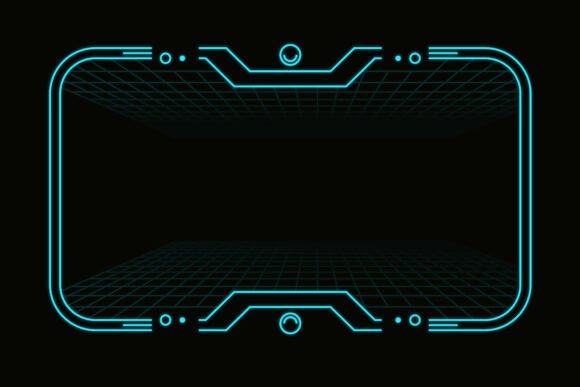
Neon Futuristic HUD Interface Frame for Creators
Clean vector geometry. Cyan light on deep black. A circuit-inspired border that frames your content like a cockpit display. The Neon Futuristic HUD Interface Frame is more than a decorative asset — it is a design tool that signals technology, precision, and forward-thinking visual language. Whether you build streaming overlays, app dashboards, or event banners, this frame gives your work an instant sci‑fi identity without requiring a single 3D render or custom illustration.
The design is deliberately minimal. A neon cyan stroke traces a path around the canvas, broken by angular cutouts and subtle grid lines that suggest depth. The black background absorbs light, making the cyan glow feel active, almost alive. This is not a retro-futurism nod — it is a clean, contemporary take on heads-up display aesthetics that works across digital and print formats.
What Makes This HUD Frame Distinct
Many neon-style graphics rely on heavy glow effects and elaborate ornamentation. This frame takes a different approach. It uses sharp, precise geometry — thin lines, right angles, and open corners — to create a frame that feels like part of an interface rather than a decorative sticker placed on top of one.
The perspective grid adds subtle dimensionality. It suggests a horizon line without forcing a full 3D environment. This makes the frame adaptable: you can place content inside it and the grid will recede naturally, letting your text, video, or imagery take focus.
Because the artwork is fully vector, you can scale it from a smartphone screen to a billboard without degradation. Colors are set up as global swatches, so changing the cyan to any other hue takes one click. Layers are organized and labeled, which means editing specific elements — like removing the grid or adjusting corner details — is straightforward even if you are not an advanced vector user.
Creative Applications Across Platforms
One frame, many contexts. The versatility of this HUD design comes from its neutrality: it references tech without committing to a specific genre. Here are practical ways different users can integrate it into their work.
Streaming and Video Overlays
Twitch and YouTube creators often need overlays that communicate energy and professionalism. A neon HUD frame can wrap around a webcam feed, gameplay footage, or a talking-head segment. The cyan-on-black palette works well against darker backgrounds, and the grid adds a tech-broadcast feel that suits gaming, coding, or tech commentary streams.
For variety, consider using the frame as a lower-third accent or as a border for alerts and notifications. Since the vector file is editable, you can extract individual line segments and animate them in After Effects or Premiere Pro — creating scan-line effects or pulse animations that sync with music or on-screen events.
App and Dashboard UI Mockups
Product designers and UX professionals can use this frame to present app interfaces in a compelling way. Instead of showing a raw screenshot, place the UI inside the HUD frame to create a concept presentation that feels polished and futuristic. The grid gives context without distracting from the actual interface.
This approach works especially well for pitch decks, portfolio pieces, or design concept videos. The frame suggests a device or display environment, helping viewers imagine how the interface would look in a real-world tech setting. For darker-themed apps — music production tools, data dashboards, or security software — the neon aesthetic reinforces the product tone.
Event Posters and Banners
Tech conferences, gaming tournaments, and product launches benefit from bold, recognizable visuals. A HUD-inspired frame can unify a poster series or banner set across print and digital channels. Because the vectors are CMYK and RGB compatible, you can produce print materials and social graphics from the same source file.
Try using the frame as a consistent border element across a campaign. Change the color to match a brand palette — red for urgency, green for data, or white for minimalism — while keeping the underlying geometric structure intact. The organized layers make global color swaps effortless.
Sci‑Fi Presentations and Thumbnails
Educators, tech speakers, and content creators who cover futuristic topics — AI, space exploration, cyberpunk culture, or emerging tech — can use this frame to set visual expectations. A presentation slide framed with neon cyan lines immediately communicates that the content is forward-looking.
YouTube thumbnails are another natural fit. A bold, clean frame around a talking head or product shot increases contrast and helps the thumbnail stand out in a crowded feed. The black background absorbs surrounding visual noise, making the subject pop without relying on heavy text overlays.
Adapting the Frame for Different Audiences
The same asset can feel corporate, underground, or educational depending on how you use it. The key is controlling the supporting elements: typography, imagery, and color palette.
For a corporate tech presentation, pair the frame with sans-serif typography, monochrome photography, and muted accent colors. Keep the cyan at a lower opacity to create a subtle structural guide rather than a dominant visual element.
For a gaming or esports context, combine the frame with bold typography, animated particle effects, and high-contrast logos. Use the neon cyan at full intensity, and consider duplicating the frame with a slight offset to create a chromatic or glitch effect.
For educational or tutorial content, use the frame to section off different areas of the screen — a code editor on one side, output preview on the other — with the HUD lines acting as natural dividers. The grid helps align content without needing additional guides.
Practical Tips for Clean Results
Vector assets like this one reward thoughtful placement. Here are recommendations to keep your output clear and professional.
- Respect the negative space. The frame creates a boundary, but the interior should not feel cramped. Leave breathing room between your content and the neon lines.
- Adjust weight for context. If the frame feels too thin on a large banner, scale the stroke weight proportionally. Vector files allow infinite adjustment without redrawing.
- Use transparency intentionally. Lowering the opacity of the grid layer can create depth while keeping the frame readable. This is useful when overlaying video or textured backgrounds.
- Limit additional effects. The frame already carries a neon quality. Adding drop shadows, outer glows, or gradients can quickly make the design feel muddy. Let the cyan lines do the work.
- Test on multiple backgrounds. The black frame works best on dark or mid-tone surfaces. On white backgrounds, consider inverting the colors — use a dark background behind the frame or swap the cyan to a darker tone.
Making It Your Own
The source files include AI, EPS, SVG, and PDF formats, as well as high-resolution PNG and JPG exports with both transparent and solid backgrounds. This means you can start editing immediately in your preferred tool — Illustrator, Figma, Photoshop, or even a vector-based web app.
Start by exploring color variations. Cyan is the default, but test a palette that fits your project: electric blue, neon pink, lime green, or even warm orange. Because the swatches are global, you can experiment without fear of breaking the design.
Next, consider structural edits. Remove the grid for a cleaner look. Extend certain lines to create a wider frame. Mirror the design for a dual-screen composition. The clean geometry makes modifications predictable, so you can push the frame toward your exact needs without fighting the original art.
For motion projects, export the vector layers separately and bring them into a motion graphics tool. Animate the lines drawing on, or pulse the opacity of the corner elements. The organized layer structure saves hours of preparation time.
Who Benefits Most From This Asset
This frame is built for anyone who needs to communicate a tech-forward identity without starting from scratch.
- Freelance designers can use it as a base for client projects, saving time while delivering a polished, custom-looking result.
- Streamers and content creators can establish a consistent visual brand across overlays, alerts, and panel graphics.
- Marketing teams can unify campaign materials for tech product launches or digital events.
- Educators and presenters can elevate slide decks and tutorial graphics with a cohesive, modern frame.
- Hobbyists and indie developers can wrap app mockups or game UI concepts in a professional shell without hiring a specialist.
The frame is also useful for social media graphics where first impressions matter. A profile banner, Instagram post, or LinkedIn background framed with this HUD design signals that the content is intentional, tech-aware, and visually considered.
Practical Inspiration for Your Next Project
Sometimes a single asset sparks a direction you had not considered. Here are a few project ideas to get started.
- Live streaming tech-talk series. Use the frame as a persistent border around the camera feed. Change the accent color each episode to match a topic — data privacy in blue, cybersecurity in red.
- Product launch one-pager. Place product screenshots inside the frame, with technical specs listed in the grid area. Print as a glossy handout for investor meetings or trade show booths.
- Interactive dashboard prototype. In Figma or Sketch, use the frame as the outer container for a mock dashboard. Add animated graphs and data cards inside to simulate a real-time monitoring interface.
- YouTube channel rebrand. Create a complete overlay package — intro card, lower third, endscreen — all using variations of the same frame. Consistency builds recognition.
- Event ticket or badge design. Scale the frame to fit a ticket layout. Add event details inside the open space. The neon border makes the ticket feel exclusive and futuristic.
Each of these projects uses the same vector file but produces distinctly different results. That is the value of a well-built asset — it gives you a reliable visual foundation while leaving room for your own creative decisions.
The Neon Futuristic HUD Interface Frame is a tool for clear, confident visual communication. Whether you are building a brand from scratch or refining an existing project, the balance of precision and flexibility in this design helps you say more with less. Start with the cyan, explore the layers, and let the structure guide your composition.