Evaluating the Neon Glow Photoshop Action for Futuristic Photo Effects
When editing digital imagery, the pursuit of distinctive visual effects often leads to specialized tools designed to streamline complex workflows. The Neon Glow Photoshop Action is one such tool, offering a one-click pathway to a futuristic, illuminated aesthetic. For digital artists, photographers, and designers evaluating whether this action suits their creative toolkit, a clear understanding of what it delivers, where it excels, and where its limitations lie is essential. This article provides a balanced examination of the action, its practical applications, and the considerations that should inform your decision.
What the Neon Glow Photoshop Action Offers
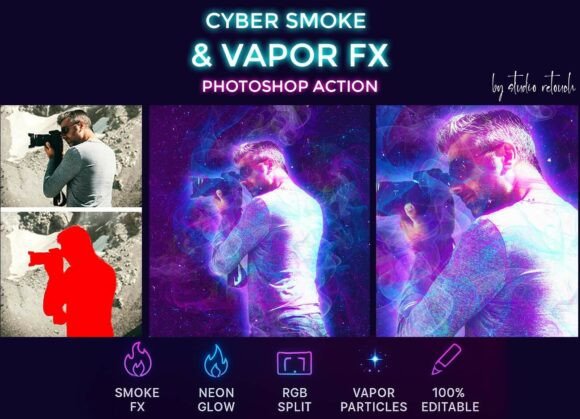
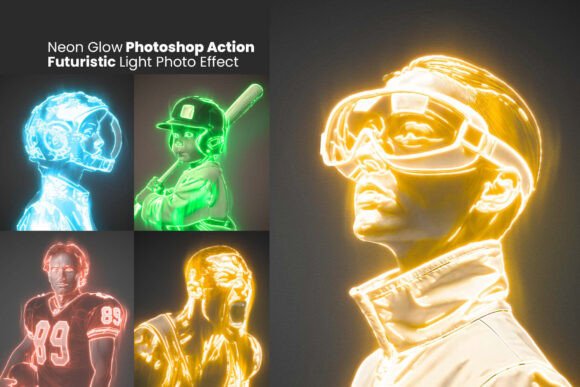
At its core, this Photoshop Action is a pre-configured set of steps that transform standard photos into neon-lit, cyberpunk-inspired artwork. The package includes an .ATN action file for applying the effect, an .ABR brush file for refining the neon look, and an .PAT pattern file for adding textured depth. The action works non-destructively, meaning original layers remain untouched, and all applied effects remain editable. Output is set at 300 DPI, making it suitable for both digital display and print reproduction. Compatibility extends from Photoshop CS6 through current versions, which broadens its accessibility across different software generations.
Why This Effect Appeals to Creators
The primary draw of a neon glow effect lies in its ability to inject energy, mood, and a futuristic character into an image. For those working in genres such as cyberpunk art, sci-fi portraiture, gaming visuals, or poster design, the neon aesthetic has become a recognisable and sought-after style. The action addresses a common pain point: manually replicating a convincing neon glow involves careful layer blending, colour selection, brush work, and lighting adjustments that can be time-consuming. By automating the heavy lifting, the action allows creators to achieve a polished result in a fraction of the time, freeing attention for compositional and conceptual refinements.
Another reason creators gravitate toward this tool is the degree of customization it permits. Because the effect is built on editable layers, users can adjust glow intensity, shift colour palettes, modify brightness, and mask out areas where the effect is unwanted. This flexibility means the action can serve as a starting point rather than a rigid final output, appealing to those who want both speed and creative control.
Strengths in Practical Use
Time efficiency is arguably the most tangible benefit. For a designer working under deadline pressure, applying a complex neon aesthetic in seconds can be a decisive advantage. The one-click application simplifies what might otherwise require dozens of manual steps. Additionally, the inclusion of custom brushes and patterns adds a layer of authenticity that generic glow effects often lack. The brushes help simulate the irregular, luminous edges characteristic of real neon tubing, while the patterns contribute subtle texture that prevents the effect from appearing flat.
The non-destructive workflow is another practical strength. Because the action preserves original layers, users can experiment freely, revert changes, or blend the neon effect with other adjustments without corrupting the base image. This is especially valuable for portrait photographers who may want to retain skin texture and natural features while adding stylized lighting.
Limitations and Considerations
No tool is universal, and the Neon Glow Photoshop Action is no exception. The effect is designed primarily for portraits and objects with clear, defined edges. For images with complex backgrounds, intricate patterns, or low contrast, the automatic selection and edge detection may produce uneven results. Users should anticipate needing to manually refine masks or adjust layer visibility in such cases. This is not a shortcoming unique to this action, but it is a realistic expectation to set before purchase.
Another consideration is file size and processing demands. Because the action creates multiple adjustment layers, brush strokes, and pattern fills, the resulting Photoshop file can become significantly larger than the original. On older computers or systems with limited RAM, performance may slow down during editing. Checking system requirements against your hardware is a prudent step before committing to a workflow that depends on this action.
The aesthetic specificity of the neon glow effect also warrants thought. While the style is popular in cyberpunk and futuristic genres, it may not suit every project. For corporate headshots, documentary photography, or minimalist design, the effect could feel out of place. The action is a specialized tool for a particular look, not a general-purpose filter. Creators whose work spans diverse styles may find they use it selectively rather than as a staple.
Situations Where the Action Is a Strong Fit
This tool excels in scenarios where a bold, high-energy visual identity is the goal. For example:
- Gaming and esports artwork: Character renders, team posters, and stream overlays benefit from the vibrant, electric aesthetic.
- Nightlife and event promotion: Flyers, social media graphics, and venue branding for clubs, festivals, or immersive events often call for neon-infused imagery.
- Music and album art: Genres such as electronic, synthwave, or hip-hop frequently embrace futuristic lighting and colour schemes.
- Personal creative projects: Hobbyists and enthusiasts exploring digital art can achieve professional-looking results without investing hours in manual techniques.
In these contexts, the action saves time while delivering a coherent, visually arresting outcome. The ability to customize colors and glow intensity also allows for brand-specific adaptations, such as matching a company's palette or adjusting the mood from aggressive to dreamlike.
Situations Where Alternatives May Be Worth Considering
For creators whose needs diverge from the action's design, alternative approaches may provide a better fit. Consider other options if:
- You require precise, photorealistic neon integration. While the action does an admirable job with stylized glow, highly realistic neon often demands manual lighting work, reference photography, and 3D simulation tools. For product photography requiring faithful neon signage, a manual approach or dedicated 3D rendering may be superior.
- Your workflow relies on non-Adobe software. Users of Affinity Photo, GIMP, or other editors cannot run Photoshop actions natively. In such cases, learning manual neon techniques or seeking platform-specific presets is necessary.
- You prefer a more subtle or variable effect. The action produces a distinct, high-contrast look. If your project calls for a faint glow or a more restrained lighting treatment, building the effect from scratch with layer styles and brushes may offer finer control.
- You are working with video or animation. Static Photoshop actions do not extend to motion graphics. For neon effects in video, tools like After Effects or specialized plugins would be more appropriate.
Practical Decision-Making Insights
When evaluating this action, consider your typical project type, your tolerance for post-processing refinement, and your comfort level with Photoshop's layer system. The action is not a magic wand that works flawlessly on every image, but it is a robust shortcut for achieving a complex style. Users who are willing to invest a small amount of time in masking and colour tweaks will likely find it a valuable addition to their toolbox.
A useful test is to apply the action to a sample image that represents your usual subject matter. This will reveal how well the effect handles your specific lighting conditions, subject contours, and background complexity. Many creators find that the instant download and lifetime free updates reduce the risk of purchase, as ongoing improvements can address early limitations.
It is also worth noting the learning curve. While the action is designed for one-click use, extracting the best results often requires understanding how each layer contributes to the final look. Experimenting with layer blending modes, opacity sliders, and brush opacity can dramatically improve outcomes. For beginners, this may involve a brief learning period. For experienced users, the editable structure offers a familiar playground for refinement.
Aligning the Tool with Your Goals
Ultimately, the Neon Glow Photoshop Action serves a clear niche: it delivers a futuristic, neon-lit aesthetic quickly and with room for customization. It is not a replacement for deep manual skill, but it is a practical accelerator for those who regularly produce stylized, high-impact visuals. If your creative goals lean toward cyberpunk, gaming, nightlife, or experimental portraiture, this action is likely to enhance your efficiency and expand your stylistic range. If your work demands photorealism, subtlety, or cross-platform compatibility, exploring alternative methods may serve you better.
By understanding both the strengths and the limitations of this tool, you can make an informed decision that aligns with your specific workflow, subject matter, and creative vision. Whether you adopt it as a go-to effect or a occasional resource, the key is to use it as a means of expressing your artistic intent rather than as a substitute for it.