Unleash Arcane Power with the Fantasy Wizard Magic Spell Icon Set
Every dungeon master, indie game developer, or fantasy author knows the moment when a story truly clicks into place. It often happens when the visual elements align with the narrative—when a player sees a spell icon and immediately understands the weight of the magic they are about to cast. The Fantasy Wizard Magic Spell Icon Set is designed to deliver exactly that moment of clarity and immersion. This collection of nine mystical silhouettes gives you a ready-made visual language for magic, so you can spend less time hunting for assets and more time building unforgettable adventures.
Whether you are designing a character sheet for a tabletop RPG campaign, crafting a user interface for an indie video game, or laying out a book cover for a fantasy novel, having a consistent set of spell and wizard icons makes your work look professional and feel cohesive. This article explores what the Fantasy Wizard Magic Spell Icon Set is, how it addresses common creative challenges, and how you can put it to use in your own projects.
What the Fantasy Wizard Magic Spell Icon Set Offers
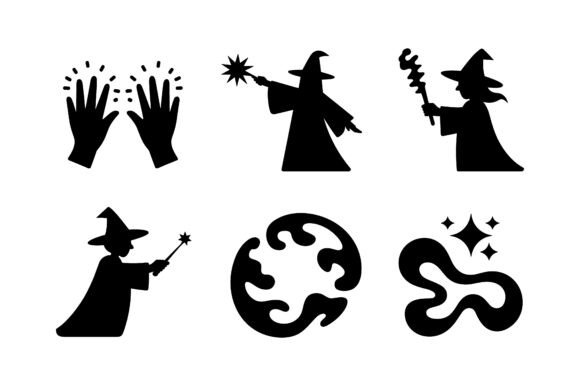
At its core, this icon set provides a vector-based EPS file containing nine fantasy-themed silhouettes. Each silhouette captures a distinct magical motif: wizards casting spells, mages holding staffs, iconic wands, and spell effects bursting with arcane energy. The entire set is presented in a clean, dynamic glyph style that reads clearly at small sizes and remains striking when scaled up.
Because the file is fully vector and scalable, you never have to worry about pixelation or resolution limits. You can resize each silhouette to fit a tiny button on a mobile game interface or enlarge it for a poster without losing any quality. The single EPS file format keeps everything organized, and because it is a digital product, you gain immediate access after purchase—no shipping, no waiting.
It is important to note that this download includes the EPS vector file only. No SVG, PNG, or JPG formats are bundled. This means you will need vector editing software such as Adobe Illustrator, Affinity Designer, or Inkscape to open and edit the file. For many designers and creators, this is actually a benefit: working directly with vectors gives you full control over color, size, and composition.
The Real Challenge: Building a Consistent Visual Language for Magic
One of the hardest parts of any fantasy project is establishing a visual identity for magic. Magic systems in fiction often have distinct schools, elements, or levels of power, and your audience needs to be able to tell them apart at a glance. Without a consistent set of icons, you end up mixing styles, using mismatched art, or—worst of all—relying on generic clip art that breaks the immersion.
Players and readers are perceptive. A spell icon that looks like it was copied from a free stock image site can undermine the credibility of your entire world. Similarly, if your game UI uses icons that vary wildly in line weight, shading, or style, the interface feels disjointed and amateurish. The Fantasy Wizard Magic Spell Icon Set addresses this head-on by offering a unified glyph language. Every silhouette in the set shares the same clean linework, consistent proportions, and dynamic posture, so your visuals stay harmonious across every use case.
Another common challenge is time. Indie creators often work alone or in very small teams, and every hour spent sourcing or creating icons is an hour not spent on writing, coding, or game design. Having a pre-made icon set that is ready to drop into your project saves you that precious time. You are not starting from scratch; you are building on a foundation that already looks polished and professional.
How This Icon Set Addresses Your Creative Needs
The Fantasy Wizard Magic Spell Icon Set is built to solve specific, practical problems that creators face every day. Here is how it helps in several common scenarios:
For Tabletop RPG Campaigns
If you are a dungeon master running a Dungeons & Dragons or other tabletop RPG campaign, you know how much players appreciate visual aids. Handouts, character sheets, and spell cards that include clear icons make the game flow faster and feel more immersive. You can use these silhouettes to represent different schools of magic—evocation, necromancy, illusion, and more—or to mark special abilities on a character sheet. The glyph style keeps the icons readable even when printed on a standard home printer, and because they are vector, you can adjust the line thickness if you need better contrast.
For Indie Video Game UI
Indie game developers face a tight balancing act between visual polish and development time. A unified set of spell or ability icons can dramatically elevate the look of your user interface without requiring a dedicated UI artist. Drop the silhouettes into your HUD, assign them to hotkeys, or use them in your skill tree. Because the set includes wands, staffs, spell effects, and wizard figures, you have enough variety to cover multiple abilities while maintaining a coherent style. The vector format also makes it easy to tint each icon to match your game's color palette or to indicate magic type at a glance.
For Fantasy Authors and Book Designers
A book cover or chapter heading is often the first thing a potential reader sees. Using a distinctive wizard silhouette or a glowing spell effect can signal the genre immediately and attract the right audience. You might place a staff-wielding wizard icon on the spine of a novel, use a wand silhouette as a recurring chapter opener, or incorporate spell effects into a map or appendix. Because the icons are vector, you can scale them to fit any layout without worrying about resolution.
For Branding and Merchandise
If you run a gaming channel, a fantasy author brand, or a board game cafe, a strong logo helps people remember you. The bold silhouette style of this set works beautifully as a logo mark, especially when paired with custom typography. You can also use the icons on themed merchandise like t-shirts, mugs, or stickers. A single well-chosen wizard or spell icon can become the visual anchor of your entire brand identity.
Practical Applications and Real-World Examples
Imagine you are designing a spell card deck for a homebrew campaign. You take the wizard casting silhouette and assign it to your primary magic-user class. The staff icon becomes the symbol for arcane focus items. A burst effect icon represents area-of-effect spells. By assigning one icon per spell school, you create a system that players can learn in minutes and recognize instantly during combat.
Or consider an indie RPG with a magic system based on four elements. You take four icons from the set—perhaps a wand, a staff, a spell bolt, and a wizard figure—and tint them red, blue, green, and yellow. Now each element has a distinct visual identifier, and players can tell at a glance which spell type they are selecting. The consistency of the silhouette style ensures the UI looks unified, while the color coding adds an extra layer of usability.
For a fantasy author, you might use the wizard silhouette on the title page of your novel and then repeat a smaller version of the spell effect icon at the start of each chapter. Over the course of the book, readers come to associate that icon with the magic in your world, building a subtle but powerful visual thread.
How Different Users Approach the Set
No two creators work the same way, and the Fantasy Wizard Magic Spell Icon Set accommodates a range of workflows. A tabletop RPG designer might open the EPS file in Inkscape, reduce the icons to black-and-white, and print them onto sticker paper for handouts. A game developer could import the vectors into Unity or Unreal Engine and use them directly as sprite assets. An author working with Adobe InDesign might place the EPS file and scale it to fit a chapter heading, confident that the vector data will remain crisp in print.
If you have vector editing skills, you can go further: change the stroke color, fill the silhouettes with gradients, combine multiple icons into a single emblem, or rotate them to create dynamic compositions. The glyph style gives you a clean starting point that is easy to modify without losing the original magic feel.
For creators who prefer raster workflows, you can export the EPS to any resolution you need inside your vector editor. Because the source file is vector, you can generate 64x64 pixel icons for a game UI or 300 DPI print files for a book cover from the same source. The flexibility is built into the format.
Key Considerations Before You Start
Because this is an EPS-only product, you will need compatible software. If you do not already have a vector editor, free options like Inkscape work well and support the EPS format. You should also plan how you want to organize the icons for your project. Renaming the files or cataloging them by theme—wizards, staffs, wands, spell effects—can save time later.
Think about color early. The silhouettes come as outlines, so you have a blank canvas to apply your own color scheme. If you are designing for a game, consider how each icon will look against different backgrounds. For print, test the icons at the size they will actually appear to ensure the details remain clear.
Also consider legal and licensing aspects. As with any digital asset, review the terms of use included with your purchase to understand how you can use the icons in commercial projects, merchandise, or derivative works. When in doubt, reach out to the seller for clarification before you invest time in a large project.
Why Vector Silhouettes Work So Well for Fantasy Projects
Silhouette-based iconography has a long history in fantasy art because it forces the viewer to focus on shape and form rather than surface detail. A wizard silhouette communicates the archetype instantly: pointed hat, flowing robes, outstretched staff. You do not need intricate shading or color to tell the story. This minimalism is actually a strength when you are working with small UI elements or when you want your icons to remain legible from across a tabletop.
The glyph style used in this set is especially effective for modern game interfaces and clean book designs. It avoids the overly ornate look that can clutter a screen or page, while still carrying a strong fantasy flavor. The result is an icon set that feels both classic and contemporary, suitable for a wide range of genres from high fantasy to dark fantasy to magical realism.
Getting the Most Out of Your Icon Set
To truly maximize the value of the Fantasy Wizard Magic Spell Icon Set, think of it as a starting point rather than a finished product. The nine silhouettes give you a vocabulary of magic, but you are the one who writes the sentences. Combine them with other design elements like borders, backgrounds, or text to create spell cards, ability trees, or class symbols. Use them as stencils for laser engraving or vinyl cutting if you want physical merchandise. Share them with your players or collaborators so everyone in your project can recognize the same visual language.
If you are building a larger collection of assets, keep this set as part of a library that you return to for every new project. The vector format means it will never become obsolete, and the classic wizard themes are timeless. Even as your skills grow and your projects become more ambitious, a solid set of spell and wizard icons remains useful.
Final Thoughts on Bringing Magic to Your Work
Every fantasy creator knows that magic is more than just a plot device—it is a feeling, a mood, a visual signature. The Fantasy Wizard Magic Spell Icon Set gives you a practical, professional tool to capture that feeling in your work. Whether you are building a campaign world, coding a game, writing a novel, or branding your creative business, these icons help you communicate the presence of magic quickly and clearly.
The best creative tools are the ones that remove friction and let you focus on what you do best. By providing a unified, scalable, and customizable set of wizard and spell silhouettes, this icon set does exactly that. You get to spend your energy on storytelling, game design, and world-building, confident that the visual foundation is solid. That is the kind of magic every creator deserves.